 Clustrix
Clustrix Documentation
Run an ordinary Python function somewhere else.
Add @cluster to a function, call it normally, and Clustrix serializes it
with its arguments, ships it to the compute resource you configured, runs it
there, and hands you back the return value. No job script, no scp, no
polling loop, no result-unpickling glue.



from clustrix import cluster, configure

configure(cluster_type="local")  # no cluster needed to try this

@cluster(cores=8, memory="16GB", time="02:00:00")
def expensive_computation(iterations=1000):
    import math

    return sum(math.sqrt(i) for i in range(iterations))

print(expensive_computation(iterations=10_000))
Change cluster_type="local" to a SLURM login node and those same lines
submit a batch job. That substitutability is the point of the library.
Start here
Introduction – what Clustrix is, what it is not, and how it compares to hand-written sbatch scripts, Dask, Ray, joblib and plain SSH.
Installation – install it, with the optional extras.
Quickstart – a real result in five minutes, beginning with a backend that needs no cluster at all.
Supported Cluster Types – the four backends Clustrix supports, and the evidence that each one runs a real job.
Backends Clustrix does not support – if you are looking for PBS, SGE, Kubernetes or a cloud VM provider, start here.
What it does
One decorator.
@clusteron a function is the whole interface.Function packaging. Your function is serialized by value with dill and cloudpickle, so closures, nested functions and project-local modules travel with it. Source code is not required.
Four backends: SLURM, SSH, HuggingFace Jobs and local execution. Each has been run end to end – see Supported Cluster Types.
Environment replication. The remote environment is rebuilt from your local
pip freeze.Read-only filesystem utilities.
cluster_ls,cluster_glob,cluster_statand their siblings work against a local path or a remote one through the same call. They inspect; they do not transfer.Shared-storage detection. A worker that already shares your filesystem is detected, so the payload is not copied across a network that does not need it.
Loop parallelization. A loop whose body carries no dependency between iterations can be distributed across nodes. The analysis is deliberately conservative and declines most real loops – see Limitations and Edge Cases.
A Jupyter widget.
%%remoteopens a configuration panel in the notebook.Errors that reach you. A remote traceback is re-raised in your own process rather than left in a log file on the cluster.
Two things that sound like features and are not. @cluster(cores=N) does not
split an ordinary local function across N workers: it runs once in your own
process, and Clustrix warns that the number was discarded whenever you asked
for more than one core. Loop parallelization is on by default, so nothing has
to be switched on: cores sizes a local pool only when the loop analysis
finds a supported loop and the function accepts the matching chunk argument.
Clustrix also does not move your data – see Introduction.
Jupyter Notebook Integration
Clustrix registers an IPython magic that opens a configuration widget:
%%remote
Importing clustrix registers the magic but does not display the widget.
A library should not inject UI as a side effect of being imported, so the
widget appears on demand: run %%remote in a cell, or call
clustrix.notebook_magic.display_config_widget(). Setting
CLUSTRIX_AUTO_WIDGET=1 makes it display on import instead.
%%clusterfy is an alias for %%remote. It works, and it emits a
DeprecationWarning.
Interactive Configuration Widget
The widget edits the same settings as clustrix.configure() and applies them
to the current session.
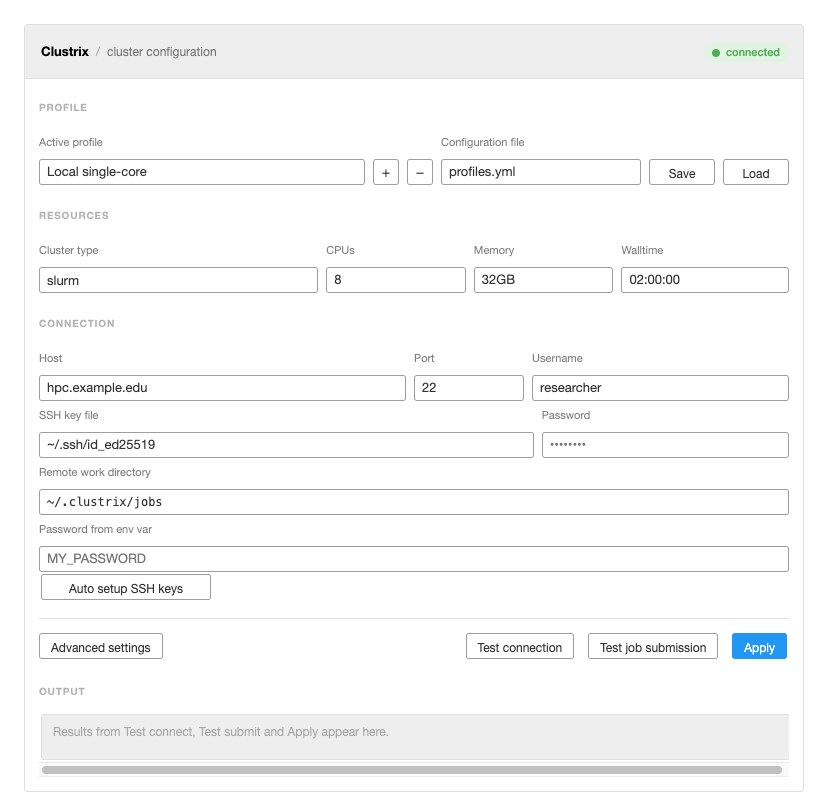
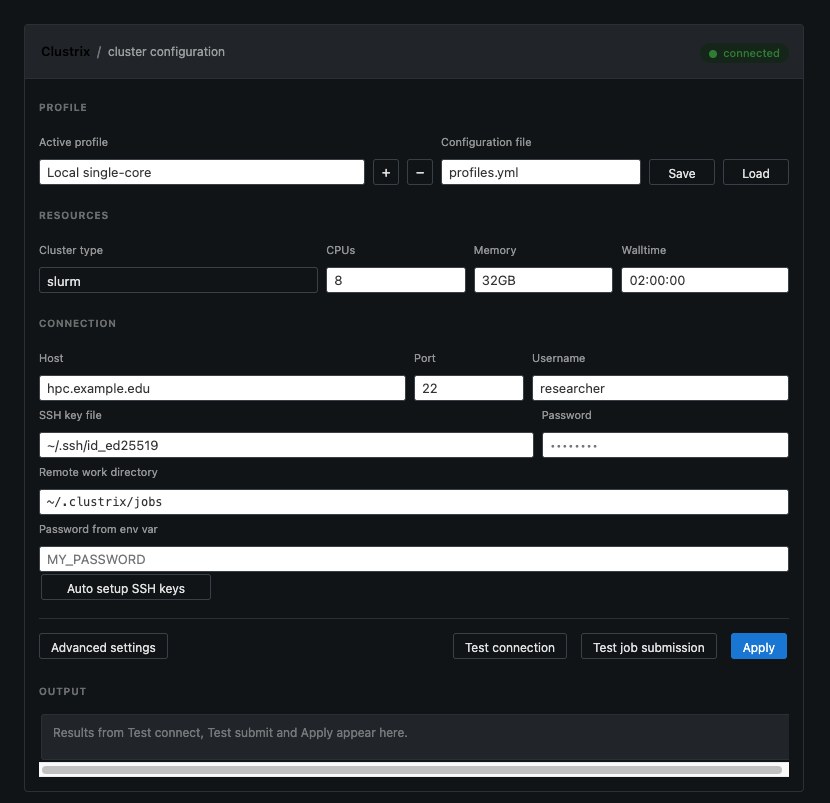
Its colours resolve through JupyterLab’s own theme variables, so it follows the notebook theme rather than carrying a second hand-maintained dark stylesheet:
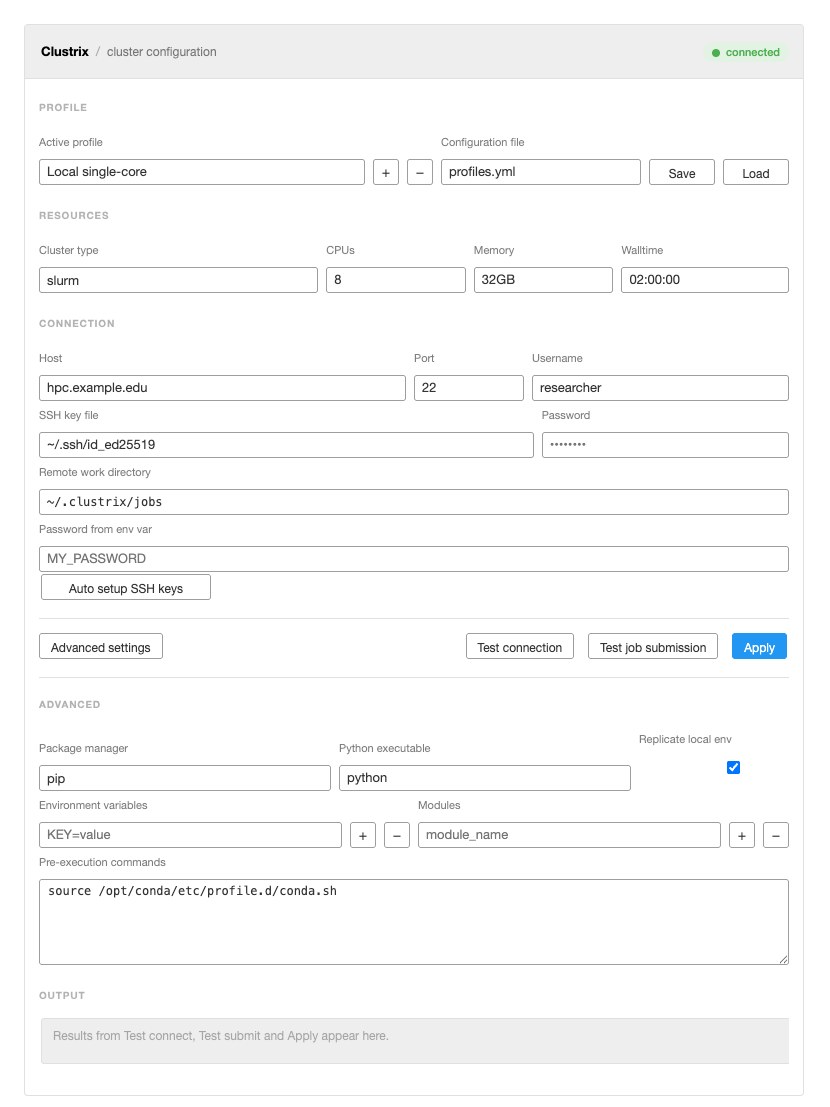
“Show advanced” reveals the package manager, Python executable, environment variables, module loads and pre-execution commands:
What the widget covers
The cluster type dropdown offers local, ssh, slurm and
huggingface – the same four values as
clustrix.config.SUPPORTED_CLUSTER_TYPES.
sshandslurmshow the connection section: host, port, username, SSH key file, password, remote work directory, an environment variable to read the password from, and an “Auto setup SSH keys” button.huggingfaceshows namespace, flavor, token and an “Allow paid GPU flavors” checkbox. GPU flavors bill by the second, so that box has to be ticked before one is accepted.localneeds no connection settings at all.
There are no PBS, SGE, Kubernetes, AWS, GCP, Azure or Lambda Cloud entries, because Clustrix does not support those backends; see Backends Clustrix does not support.
Table of Contents
Getting Started
- Introduction
- Installation
- Quickstart
- Install
- Step 1: your first result, with no cluster at all
- Step 2: a parameter sweep
- Step 3: use all your cores on one machine
- Step 4: find your data before you compute on it
- Step 5: a real SLURM cluster
- Step 6: one big machine over SSH
- Step 7: no cluster of your own
- Step 8: stop repeating your configuration
- Which backend should I use?
- Where to go next
User Guide
- Execution Model
- Decoration time versus call time
- The order of operations on a call
- Step 2: resource resolution
- Step 3: local or remote
- Step 6: serialization
- Step 6b: environment replication
- Step 7: the two-venv model
- Step 7b: the job directory and the signing key
- Step 7c: the job script
- Steps 8–9: polling, verification, and the result
- Per-backend divergence
- Failure modes, stage by stage
- See also
- Configuration
- Data packages
- SSH Key Setup for Remote Clusters
- Limitations and Edge Cases
- Functions whose source cannot be read
- Editable installs, git checkouts and local source trees
- Local cores require splittable work
- Loop detection is much narrower than it looks
- Auto-parallelization needs chunk parameters, and they differ local vs remote
- Parallel and sequential runs can return different shapes
- Python version skew is refused, not worked around
- Things that genuinely cannot be sent
- Results can only be collected by the process that submitted them
- Backends Clustrix does not support
- Windows clients: config and credential files are not permission-restricted
- Smaller sharp edges
- See also
- Troubleshooting
Interactive Notebooks
- Local Parallel Execution: A Measured Comparison
- What
cluster_type="local"does - A workload that lives in a file
- Baseline 1: the decorator against a bare call
- Threads or processes, and who chooses
- CPU-bound work: processes win, threads do not
- I/O-bound work: threads win, and processes pay for nothing
- Fan-out that is too small to be worth it
- The automatic loop parallelization, and why to leave it off
- Summary of this run
- When to reach for this, and when not to
- What
- Filesystem Utilities Tutorial
- Clustrix Configuration Manager Example
- Complete Clustrix API Demonstration
- SLURM Cluster Tutorial
- Prerequisites
- What Clustrix Does Behind the Scenes
- Installation and Setup
- Basic SLURM Configuration
- Example 1: Simple Mathematical Computation
- Example 2: Machine Learning Model Training
- Example 3: Parallel Data Processing with Automatic Loop Distribution
- Example 4: Scientific Computing - Numerical Integration
- Example 5: Bioinformatics - Sequence Analysis
- Parameter Sweeps: No Native SLURM Job Arrays
- Monitoring and Debugging
- When a Job Fails: What Is in the Job Directory
- Configuration Best Practices
- Summary
- SSH Remote Execution Tutorial
- New: Automated SSH Key Setup
- Prerequisites
- What Clustrix Does Behind the Scenes
- Step 1: Automated SSH Key Setup
- Step 2: Configure Clustrix
- Example 1: Basic Remote Computation
- Example 2: Remote Data Processing with NumPy
- Example 3: Remote filesystem analysis
- Example 4: Remote Environment Testing
- SSH Connection Testing and Troubleshooting
- When It Fails: What Is in the Job Directory
- Summary and Best Practices
- Clustrix Basic Usage Tutorial
API Reference
- Decorator API
- Filesystem Utilities
- Dependency Analysis
- File Packaging System
- Configuration API
DEAD_BUT_ACCEPTED_FIELDSClusterConfigSUPPORTED_CLUSTER_TYPESREMOVED_CLUSTER_TYPESvalidate_conda_env_name()validate_cluster_type()DECLARED_FIELD_NAMESCONFIG_FILE_METADATA_KEYSPERSISTABLE_KEYSUNCLASSIFIABLE_FIELDSstrip_secret_fields()config_document()write_text_securely()write_config_file_securely()CONFIG_SOURCE_RUNTIMECONFIG_SOURCE_EXPLICIT_FILECONFIG_SOURCE_USER_CONFIG_DIRCONFIG_SOURCE_WORKING_DIRECTORYCONFIG_SOURCE_REDIRECTED_CONFIG_DIRCONFIG_SOURCE_UNRECORDED_PROVENANCETRUSTED_CONFIG_SOURCESUNTRUSTED_CONFIG_SOURCESCONFIG_SOURCESCONFIG_SOURCES_KEYconfig_name_from_document()recorded_config_source()config_source_for_saved_entry()normalize_hostname()config_built_from_file()set_config_source()record_discovered_hostname()source_that_named_hostname()get_config_source()config_source_is_trusted()ConfigFileErrorconfigure()config_field_names()split_config_kwargs()load_config()save_config()get_config_dir()default_config_dir()config_source_for_discovered_path()config_dir_is_default()get_config()- Configuration Methods
- Notebook Magic Commands
- Local Executor API
- Public API reference
Supported Cluster Types
Execution backends
Clustrix supports exactly four cluster_type values – the contents of
clustrix.config.SUPPORTED_CLUSTER_TYPES, which is also what the CLI and
the notebook widget offer. There are no others.
|
Status |
Notes |
|---|---|---|
|
Verified |
A real job ran on |
|
Verified |
Direct execution, no scheduler. A real job ran on an 8-GPU host. |
|
Verified |
HuggingFace Jobs. A real job ran in a container. |
|
Works |
Runs in the calling process. Used for development and the fast tests. |
cluster_type='huggingface' means HuggingFace Jobs. There is no
HuggingFace Spaces provider; see Backends Clustrix does not support.
Backends Clustrix does not support
PBS, SGE, Kubernetes, AWS, GCP, Azure and Lambda Cloud are absent, and so are
the cost-monitoring and cloud pricing APIs that served them. Clustrix does not
claim a backend it has not run a real job on, and none of these has one.
Setting cluster_type to any of those names raises a ValueError naming
the backend and its tracking issue. Each is planned for a future release;
Backends Clustrix does not support has the details and the links.
Evidence
The three “Verified” rows are the backends exercised by
scripts/collect_execution_evidence.py, which submits a genuine job to each
reachable target, waits for it, and prints what came back. Nothing in it is
mocked, and a target it cannot reach is reported as skipped rather than as
passing:
python scripts/collect_execution_evidence.py            # all reachable targets
python scripts/collect_execution_evidence.py slurm gpu  # a subset
Credentials come from ~/.clustrix-dev-credentials or from the environment
(CLUSTRIX_SLURM_PASSWORD, CLUSTRIX_GPU_PASSWORD, HF_TOKEN).
Links
GitHub Repository: https://github.com/ContextLab/clustrix
PyPI Package: https://pypi.org/project/clustrix/
Issue Tracker: https://github.com/ContextLab/clustrix/issues
Discussions: https://github.com/ContextLab/clustrix/discussions